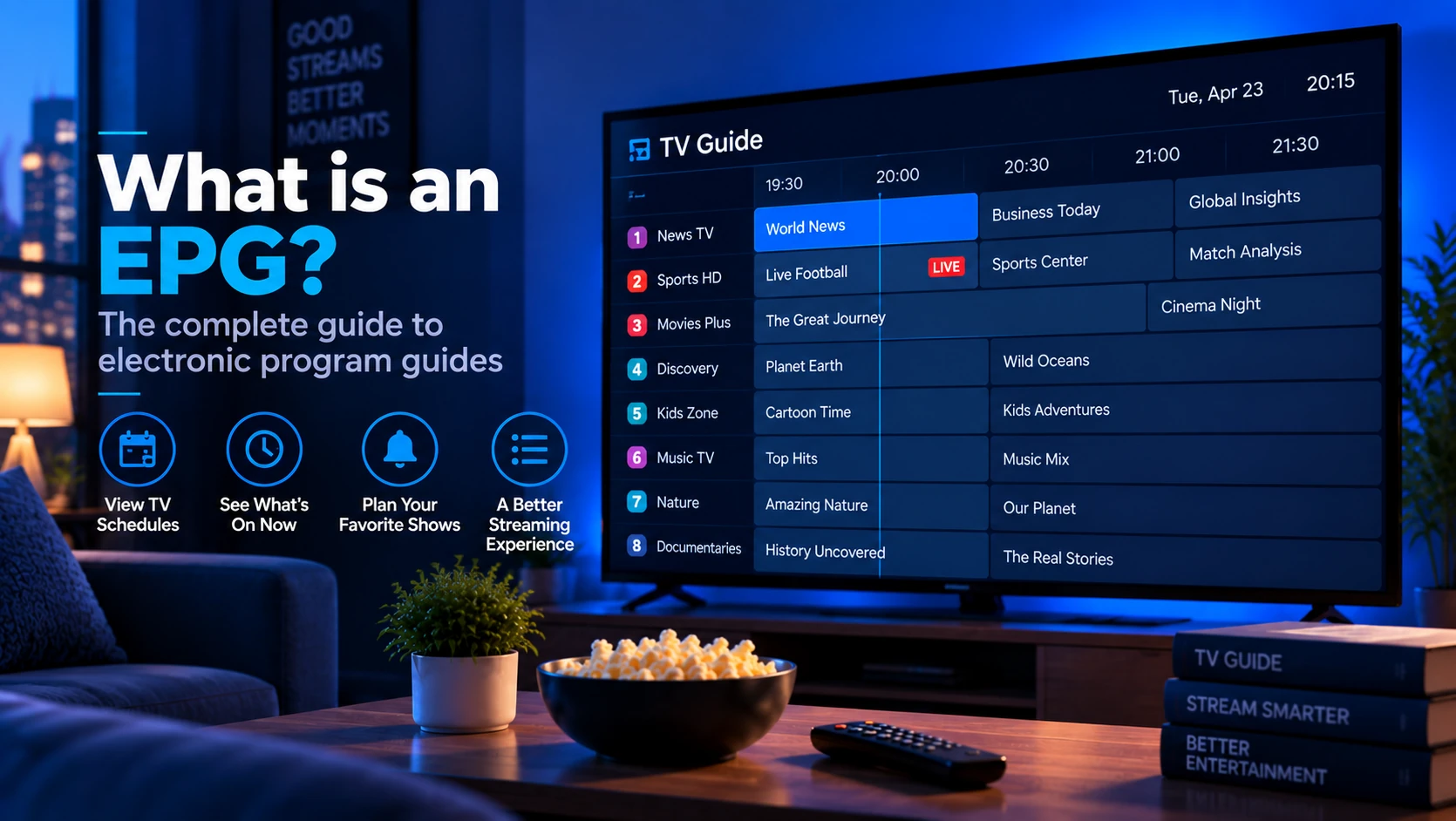
An EPG (Electronic Program Guide) is the data that powers the "what's on TV" grid in your IPTV app. It tells your player which programme is airing on each channel right now, what is up next, and — where your provider supports it — what aired in the past few days for catch-up. Without an EPG you still get channels, but you are navigating them by name only.
Quick answer: An EPG is a separate file (usually XMLTV) your player downloads alongside the playlist. Each channel in the playlist carries a
tvg-id, and the EPG file uses the same ID to attach a schedule to that channel.
What Does "EPG" Mean?
EPG stands for Electronic Program Guide — the industry term for on-screen TV listings. On cable boxes it is the grid you scroll; in IPTV it is the same grid rendered by your app from downloaded schedule data.
The data itself is not embedded in the video stream. IPTV pulls programme schedules from a structured file, most commonly XMLTV — an XML format (extension .xml or an .xml.gz download) that lists channels and their programmes. The de-facto reference is the XMLTV DTD, and the format is what free data sources like xmltv.se and most provider dashboards emit.
How EPG Data Flows to Your Player
The flow mirrors how playlists work (see How IPTV Playlists Work):
- You add an EPG URL — in most IPTV apps this is a separate field from the playlist URL, usually labelled "EPG", "XMLTV", or "TV Guide".
- The player downloads the EPG file — typically on startup and on a refresh interval (every 6–24 hours).
- The player matches
tvg-idvalues — each channel entry in the playlist carries atvg-idattribute (for exampletvg-id="bbc.one"), and the EPG file contains<channel id="bbc.one">entries. When the IDs match, programme data attaches to that channel. - The grid populates — the player now shows programme names, start/end times, and descriptions in now/next rows or a full grid.
The playlist and EPG are independent files. A channel can play perfectly while its EPG stays blank — that is a tvg-id matching problem, not a stream problem.
Playlist vs EPG: The Difference Beginners Miss
Your IPTV player usually needs two different URLs:
| URL type | What it contains | What happens if it is wrong |
|---|---|---|
| Playlist / M3U URL | Channel names, groups and stream URLs | No channels, or channels that do not play |
| EPG / XMLTV URL | Programme titles, times and descriptions | Channels play, but the guide is blank |
Do not paste the EPG URL into the playlist field, and do not paste the M3U playlist into the EPG field. They can look similar because both may include your username and password, but they serve different jobs.
What an XMLTV EPG File Looks Like
An EPG file contains two things: a channel list and a programme schedule. Example (trimmed):
<?xml version="1.0" encoding="UTF-8"?>
<tv>
  <channel id="bbc.one">
    <display-name>BBC One</display-name>
    <icon src="https://cdn.example/logos/bbc-one.png"/>
  </channel>
  <programme start="20260913190000 +0000" channel="bbc.one">
    <title lang="en">News at Seven</title>
    <desc lang="en">National and international news.</desc>
  </programme>
</tv>
Your player reads id on each <channel> and matches it against the tvg-id values in your M3U playlist. The relation is one-to-one and case-sensitive — bbc.one and BBC.one will not match.
How tvg-id Matching Works
The player connects playlist channels to EPG listings by comparing two values:
#EXTINF:-1 tvg-id="bbc.one", BBC One
<channel id="bbc.one">
If those IDs match exactly, the player can show programme data. If they do not, the channel may still play but the guide stays empty. This is why public EPG sources often fail with private provider playlists: the stream can be real, but the ID naming system is different.
When diagnosing EPG issues, copy one channel's tvg-id from the playlist and search for that same ID inside the XMLTV file. If it is not present, the source does not match that channel.
Where Do You Get an EPG URL?
- From your provider — most IPTV providers supply an EPG URL in their dashboard or setup guide. It may require the same username/password as your playlist URL.
- From the playlist itself — some playlists include a
#EXT-X-STREAM-INF-style reference or a separate#EXTINF tvg-idlist, but the EPG URL is not part of the playlist file; providers usually mention it separately. - From aggregators — sites like xmltv.se publish free public XMLTV files. Accuracy varies and IDs rarely match a provider's playlist, so a provider-supplied EPG is almost always what you want.
Setting Up EPG in Common Players
| Player | Where to enter the EPG URL |
|---|---|
| IPTV Smarters Pro | Playlist settings → Add EPG → enter URL |
| TiviMate | Settings → TV Guide → EPG source → add XMLTV URL |
| GSE Smart IPTV | Settings → EPG sources → add URL |
| Kodi + PVR IPTV Simple | Add-on config → XMLTV URL field |
Once added, force a refresh (in TiviMate: Settings → TV Guide → refresh; in Smarters: reload the app) and wait a few seconds for the file to download.
EPG Setup Checklist
Use this order before changing apps or deleting profiles:
- Open the EPG URL in a browser and confirm it returns XML or a compressed XMLTV file.
- Confirm your IPTV player has the EPG URL in the TV guide field, not the playlist field.
- Force a manual EPG refresh.
- Restart the app after the first sync.
- Check whether every channel is blank or only some channels are blank.
- If only some are blank, compare the playlist
tvg-idwith the XMLTV<channel id>.
That last distinction matters. "All channels blank" often means the EPG file did not load. "Some channels blank" usually means ID matching failed.
Why Your EPG Is Blank — and How to Fix It
The same small set of causes explains nearly all guide problems:
tvg-idmismatch — the playlist usestvg-id="bbc1"but the EPG file declares<channel id="bbc.one">. Either edit the playlist or use a matching EPG source.- Wrong or expired EPG URL — the EPG URL may carry credentials that rotate, exactly like playlist URLs. Regenerate it from your provider panel.
- Timezone offset wrong — some players need a UTC offset configured (e.g.
+0000,-0500) so programme times line up with your local clock. - File too large — big XMLTV files can take minutes to download; the player may have a timeout. Try a
.xml.gzorxmltv.zcompressed source if your provider offers one. - EPG refreshed only on startup — if a channel changes its schedule and the TV guide looks "stuck", trigger a manual refresh.
- Compressed file unsupported — some apps accept
.xml.gz, while others need plain.xml. - Region mismatch — the EPG source may list a different regional version of the channel than your playlist.
For a step-by-step walkthrough of the tvg-id relationship, see the anatomy of an M3U line in What Is an IPTV Playlist?.
Timezone and Offset Problems
If the guide loads but every programme is one or two hours early or late, the problem is usually timezone handling rather than playlist matching. Check your device timezone, the player's EPG offset setting, whether the XMLTV file uses UTC offsets such as +0000, daylight-saving changes, and whether your provider supplies a region-specific EPG.
Do not change every channel manually until you have checked the global offset first. Most IPTV apps include a TV-guide offset setting for exactly this problem.
EPG vs Catch-Up: Not the Same Thing
EPG shows the schedule. Catch-up lets you play a past programme from that schedule. Catch-up requires both an EPG (so the past shows are known) and provider-side recording/Timeshift support. If you see "catch-up" items greyed out in a player like IPTV Smarters, that means the provider's stream does not offer catch-up for that channel, not that the EPG is broken.
Sources and Technical References
- XMLTV DTD — the common XMLTV structure used for EPG data.
- Kodi PVR documentation — official background on TV guide/PVR behavior in Kodi.
- IPTV Simple Client documentation — Kodi-specific playlist and XMLTV fields.
- What Is an IPTV Playlist? — explains where
tvg-idappears in M3U files.
FAQ
Is an EPG required for IPTV to work?
No. Channels stream without any EPG. The EPG only adds programme titles, descriptions, and times to the interface — it is a UX feature, not a transport requirement.
Can I use a public EPG instead of my provider's?
You can, but the tvg-id values in your playlist almost certainly do not match a public EPG's channel IDs, so most channels would stay blank. A provider-supplied EPG is designed to match your playlist. If you do mix sources, expect to edit the playlist's tvg-id attributes manually.
How often does EPG data update?
Provider EPGs typically refresh every 12–24 hours, with programme data spanning 7–14 days ahead. Your player downloads the file on startup and at its configured interval, so schedule changes can lag by a few hours.
Does EPG work on VLC?
No. VLC has no M3U-EPG grid. You need a dedicated IPTV app (IPTV Smarters, TiviMate, GSE Smart IPTV) to display programme listings.
Why do some channels show an EPG and others not?
Each channel matches its tvg-id individually. A single channel with no guide data usually means its tvg-id in the playlist does not exist in the EPG file — check both sides for the exact ID.
Is XMLTV the same as M3U?
No. M3U lists the channels and stream URLs. XMLTV lists programme schedules. Your IPTV player combines both to build the live TV guide.
Why is my EPG one hour wrong?
Check the player timezone/offset setting first. A one-hour error is often caused by daylight-saving time or a UTC offset mismatch, not by a broken playlist.
Next steps: Read how the tvg-id attribute attaches to streams in What Is an IPTV Playlist?, then configure the EPG alongside your playlist in How to Add an IPTV Playlist to a Player. If your guide goes blank after working, revisit the causes in IPTV Playlist Not Working.